
Before checkout or inside checkout?
On a store without Shopify Plus, place MyTimologio on a product page, cart page or a custom cart position. A supporting theme can host the app block; a cart drawer uses the app embed together with the mount snippet. These are storefront placements before the checkout itself.
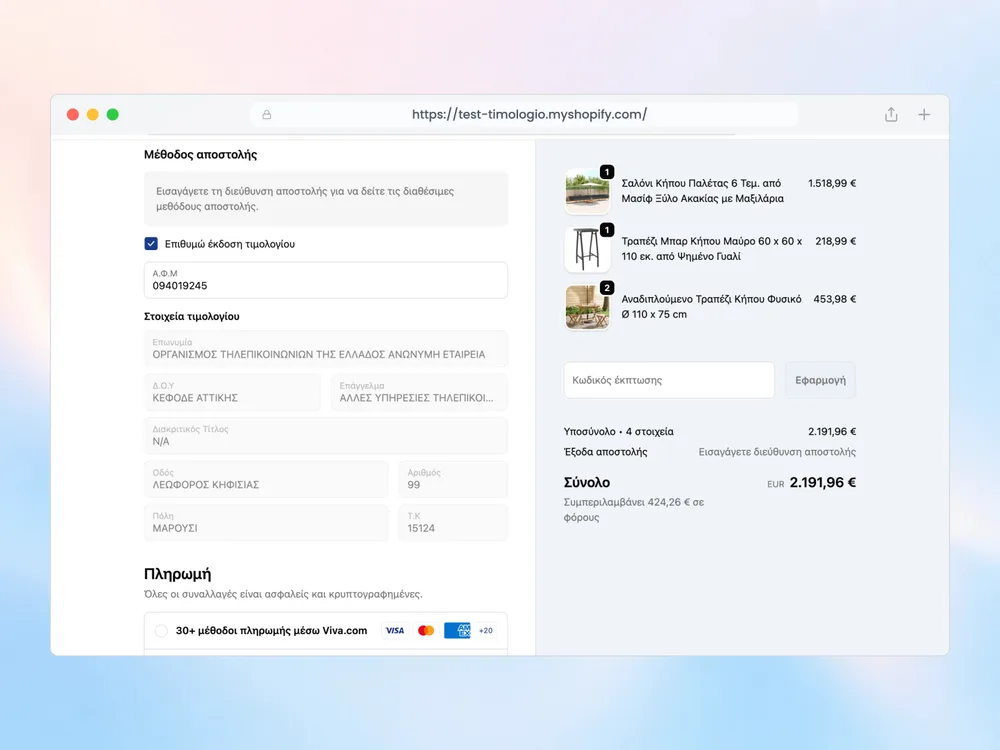
Shopify Plus stores can add the dedicated form inside checkout using the checkout editor. This is a different extension from the storefront block and should be tested separately. A paid MyTimologio subscription does not remove Shopify’s plan restrictions.
| Placement | Without Plus | With Plus |
|---|---|---|
| Product / cart form | Available with suitable theme placement | Available with suitable theme placement |
| Drawer form | Embed plus mount snippet | Embed plus mount snippet |
| Form inside checkout | Unavailable | Dedicated checkout block |
| Thank you details display | Available | Available |
Follow an actual purchase
For a cart-first store, a customer can choose invoice and validate the number before proceeding to checkout. Inspect the completed order to verify those values travelled with the purchase. Then try a direct Buy now button: if it skips your form, that route needs separate consideration.
The Thank you box displays saved details after purchase on all plans. It does not make the earlier checkout form available on a non-Plus shop and should not be treated as a substitute for capture.
MyTimologio remains a companion to your ERP or invoicing provider regardless of placement. It saves the request and fields; your existing system issues the tax document. Use installation and the field reference to check the complete handoff.
Related questions
Can Basic pre-fill the company name and address in checkout?
No. On non-Plus plans Shopify does not allow apps to fill checkout fields. The form inside checkout requires Plus. On Basic and other plans the product or cart form saves invoice details in the order’s Additional details. They remain unchanged even when the customer chooses a different shipping address. An optional thank-you block is also available.
Does the Thank you box work without Plus?
Yes. The optional Thank you box displays saved invoice details on every Shopify plan, including Basic. It is a post-purchase display, not a replacement for collecting details before purchase. Add it through the Thank you page editor and test both an invoice order and a receipt order.
What about Buy now and accelerated checkout?
A route that skips the product or cart form can reach checkout without captured details. Test Buy now, accelerated buttons and your mobile purchase path separately. The Plus checkout block is a distinct placement; no blanket guarantee is made that every express flow shows or requires the form.